A research run takes one question, searches the web over several rounds, grades every source it finds, and writes a cited report from the sources it kept. This guide walks through one run from the empty form to the finished report.
Before you start
You need a Farside Research account. New workspaces start with a trial of 150 credits and no card on file. A Standard run costs 25 credits, so the trial covers several runs. Deep research is not part of the trial.
Start a run
- Click New research in the top bar. The form opens on step 1 of 3: Decision, Clarify, Review plan.
- Type your question in Your question. You have up to 2,000 characters. The example chips under the box fill in a sample question if you want to see the shape of one.
- Fill in What decision will this support? and Who needs to trust the answer? Both are optional. They feed the research brief the engine writes before it starts searching. The guide on writing a research brief covers what to put here.
- Under How deep should we go?, pick Standard or Deep. Each option shows its current credit price.
- Open Optional organization and scope if you want to set a research type, a namespace, tags, domains to prefer or exclude, or reference files (PDF, DOCX, text, Markdown or CSV, up to 25MB each).
- Click Continue. Step 2, Sharpen the question, asks up to three short questions about the decision, the scope and the time horizon. Answer what matters or click Skip to review. This step is free.
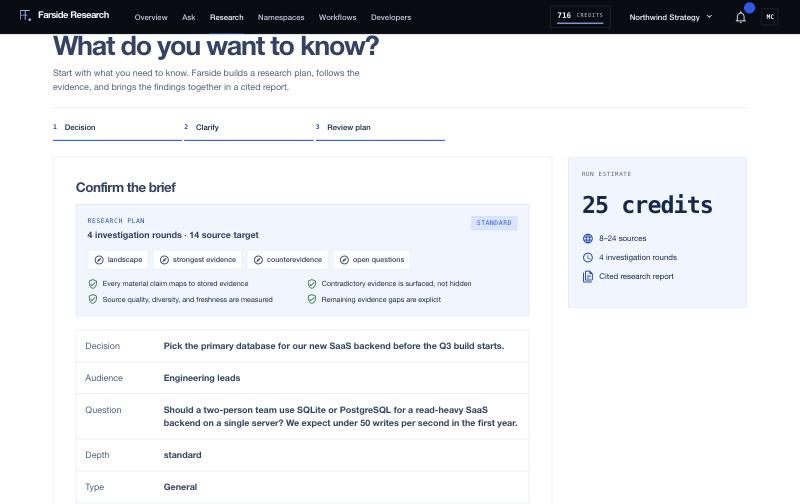
- Step 3, Confirm the brief, shows the research plan: the number of investigation rounds, a source target, the investigation tracks and the quality gates. It also lists the decision, audience, depth, type, files, cost and your balance after the run.
- Click Start research.
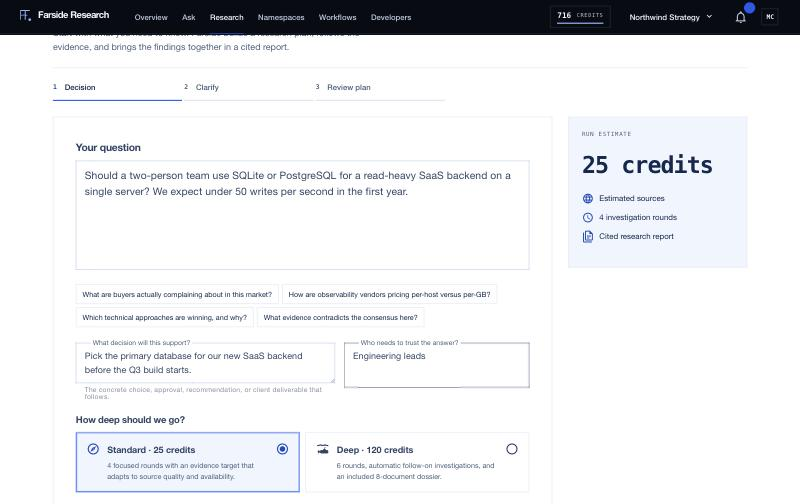
The Run estimate panel on the right updates as you change the form. It shows the cost, an estimated source range and the number of investigation rounds. If your balance or a spending limit would block the run, the form tells you before you start, and the Start research button stays disabled.
Standard or Deep
| Standard | Deep | |
|---|---|---|
| Price | 25 credits | 120 credits |
| Investigation rounds | 4 | 6 |
| Estimated sources | 8 to 24 | 24 to 54 |
| Estimated time | 7 to 18 minutes | 30 to 60 minutes |
| Extras | Cited report | Follow-on investigations and an included 8-document dossier |
Prices come from the live price list, so check the form for the current number. The source and time ranges are estimates. The run stops searching when it has used its rounds, and the final count depends on what the web has on your topic.
Start with Standard. You can add rounds to a finished report later with Extend, or follow one thread in depth with a rabbit hole, without paying for a full Deep run up front.
While it runs
The run page opens right away. The section in the left sidebar is called Live progress while the run is active, and the main panel, Watching the evidence build, lists events as they happen: queries sent, sources found, rounds completed.
The sidebar shows Live counters: sources kept, sources found, sources dropped and credits reserved. Credits are reserved when the run starts and settled when it finishes. A bar across the top tracks the phases: the brief, each round, synthesis and fact-check.
You can leave the page. The run keeps going on the server, and the report is waiting when you come back. If live updates drop, the page falls back to checking the status every five seconds.
To stop a run, click Cancel run. The run checks for cancellation before each new round, so it may finish the round in progress first.
Reading the result
When the run completes, the sidebar section becomes Report and the counters switch to the final numbers: sources kept, sources found, quality score and credits used. The report follows a fixed outline (Bottom Line, Key Findings, Analysis, Data and Comparisons, Contradictions, Limitations, Recommendations), and each heading is a link in the sidebar.
Numbers in brackets are citations. Click one to open a card with the source's site, title, a short summary and its quality and relevance scores. The guide on reading a report covers the rest: charts, the sources list, the evidence ledger, exports and sharing.
Reading a report, exporting it and opening sources cost nothing.
Doing the same thing from the API
The web app and the REST API create the same kind of run. Every paid request takes an Idempotency-Key header, so a retry with the same key never starts a second run.
curl -X POST https://api.farsideresearch.com/v1/runs \
  -H "Authorization: Bearer $FARSIDE_API_KEY" \
  -H "Idempotency-Key: $(uuidgen)" \
  -H "Content-Type: application/json" \
  -d '{"question":"How is database licensing changing?","depth":"standard","research_type":"technical"}'
Then read the run with GET /v1/runs/RUN_ID, or stream progress from GET /v1/runs/RUN_ID/events.