Ask lets you question the evidence your runs already collected. It answers from retained sources, cites each claim, and tells you when the research doesn't cover something instead of guessing. There are two places to ask: Ask in the top bar works across reports, and Ask a follow-up on a report works on that one report and can search the web.
Ask across your reports
- Click Ask in the top bar. The page is titled Ask your research.
- Pick a scope: This report, Selected reports (2 to 25), a Namespace, a Tag or the Whole workspace. Only completed reports are included.
- Type a question (up to 1,500 characters) and press Enter, or click Ask.
- Read the answer. Citation numbers link to the excerpt behind each claim, and the evidence panel shows what was retrieved.
- Ask the next question in the same conversation, or pick one of the suggestions under Keep exploring.
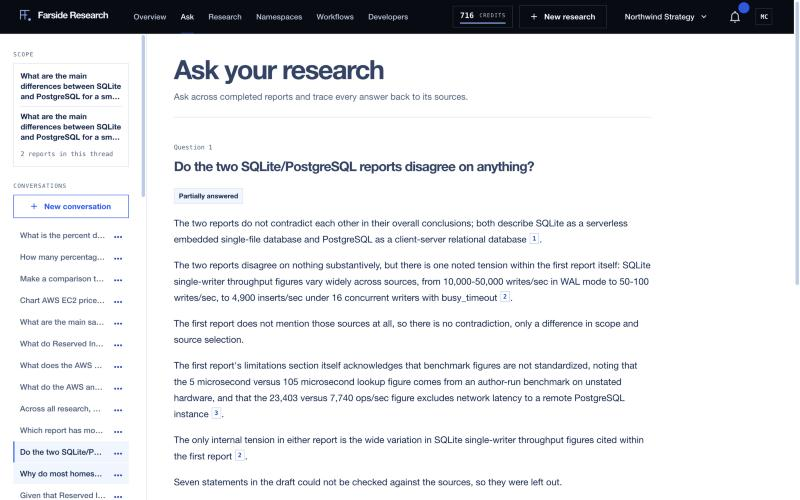
The set of reports is frozen when you start a conversation. A report you finish later won't show up in an old conversation, so start a new one to include it. Past conversations are listed on the left, and you can delete one from its menu.
What it answers from
Ask only reads the reports in scope: their findings and their retained sources. It doesn't search the web and doesn't use other reports in your workspace. It always searches the in-scope findings and sources for your question before it drafts anything, so a "not covered" answer is never given without a search.
How answers are checked
The draft answer goes through a verifier before you see it. Every sentence and table row is treated as a claim, and each one has to:
- cite evidence that was actually retrieved,
- contain only numbers that appear in the cited excerpts,
- be judged "supported" by a separate check.
Anything that fails is removed, not softened. When something was removed, the answer is marked Partially answered and ends with a plain count of what was left out, as in the screenshot above. Charts, key figures and timelines in answers follow the same rule as reports: their numbers have to trace to cited evidence.
Follow-ups
Each conversation keeps its recent history, so "what about the second vendor?" works. After an answer you'll usually see two to four suggested next questions that the research can answer.
What it won't answer
- When the research in scope doesn't cover the question, the answer is "The research in scope doesn't show this." followed by what was searched.
- When your question is about a report that isn't in scope, it says so and lists the reports that are.
- Only one question runs at a time in a conversation.
Ask a follow-up on one report
On a completed report, click Ask a follow-up. A drawer opens with the same idea, scoped to that report's sources. It has one extra option: Search the web for newer evidence. With it on, Farside searches the web for your question and pulls in up to five new pages alongside the report's sources before answering.
What it costs
Every workspace gets free questions each day: 10 on the free trial, 15 on Solo, 25 on Starter, 100 on Pro and 300 on Team. Ask your research, Ask a follow-up on a report, the API and MCP all draw on the same allowance. The composer shows how many you have left and when they reset (midnight in your workspace's time zone).
| Where | Cost |
|---|---|
| A question, within today's free allowance | Free |
| A question, after the free allowance | The per-question price on the pricing page |
| Ask a follow-up with web search | 6 credits, never free |
A question that fails or is cancelled doesn't use a free question, and any credits held for it are released. The Usage page shows each hold, charge and release in the credit ledger.
From the API
# Start a conversation over one report
curl -X POST https://api.farsideresearch.com/v1/ask/conversations \
  -H "Authorization: Bearer $FARSIDE_API_KEY" \
  -H "Content-Type: application/json" \
  -d '{"scope":{"kind":"run","ids":["RUN_ID"]}}'

# Ask a question in it
curl -X POST https://api.farsideresearch.com/v1/ask/conversations/CONVERSATION_ID/turns \
  -H "Authorization: Bearer $FARSIDE_API_KEY" \
  -H "Idempotency-Key: $(uuidgen)" \
  -H "Content-Type: application/json" \
  -d '{"question":"Which option handles concurrent writes better, and by how much?"}'
Scope kinds are run, runs, namespace, tag and workspace. The per-report version is POST /v1/runs/RUN_ID/ask with {"question": "...", "allow_search": false} and its own Idempotency-Key. Reuse a key only to retry the same question; a new key is a new paid question. Over MCP it's the ask_research tool.