Farside Research charges for work in credits. Every paid action has a published price that you see before it runs. Reading and exporting what you already have is free.
What a credit is
A credit is a fixed unit of work. Prices are set per action, not per token or per search, so provider pricing never changes what you pay. Credits are reserved when a paid action starts and settled when it finishes.
What actions cost
| Action | Credits |
|---|---|
| Standard research run | 25 |
| Deep research run (includes follow-on investigations and a dossier) | 120 |
| Extend a run with more rounds | 40 |
| Rabbit hole | 20 |
| Dossier | 60 |
| A question about your research (Ask, or a follow-up on one report) | Free up to your plan's daily allowance, then the per-question price |
| A follow-up with web search | 6, never free |
| Regenerate a dossier document | 8 |
| Regenerate a report from collected sources | 6 |
| Research workflow | Each step's price; the editor shows the most one run can cost |
| Reading, sharing and exporting | 0 |
The per-question price after the free allowance is on the pricing page, which reads the live price list. The other prices above are the current published ones.
Free questions each day
Every workspace gets free questions each day, shared by Ask your research, Ask a follow-up on a report, the API and MCP:
| Plan | Free questions per day |
|---|---|
| Free trial | 10 |
| Solo | 15 |
| Starter | 25 |
| Pro | 100 |
| Team | 300 |
The day runs midnight to midnight in your workspace's time zone. A question that fails or is cancelled doesn't count. Web search is always charged.
Plans
| Plan | Monthly | Yearly | Credits per month | Seats | API keys | Overage per 1,000 credits |
|---|---|---|---|---|---|---|
| Solo | $9 | Monthly only | 350 | 1 | 3 | $40 |
| Starter | $29 | Monthly only | 800 | 3 | 3 | $40 |
| Pro | $99 | $990 | 2,500 | 10 | 10 | $60 |
| Team | $349 | $3,490 | 10,000 | 25 | 50 | $50 |
Every plan includes the web app, the REST API and MCP at no extra charge. Pro and Team can bill yearly; Solo and Starter bill monthly. For more than Team covers, contact us. To change plans, go to Settings, then Billing. Payment runs through Stripe, and you see the prorated amount before you confirm.
The free trial
New workspaces get 150 credits with no card required. That's enough for six Standard runs. The trial includes Standard research, reading reports, public share links, exports (PDF included) and 10 free questions a day, with one seat and one API key. Deep research, dossiers and webhooks need a paid plan.
Where your credits come from
When a paid action runs, credits are drawn in this order:
- Plan credits from your monthly allowance.
- Prepaid credits you bought as packs.
- Overage, only if you turned it on.
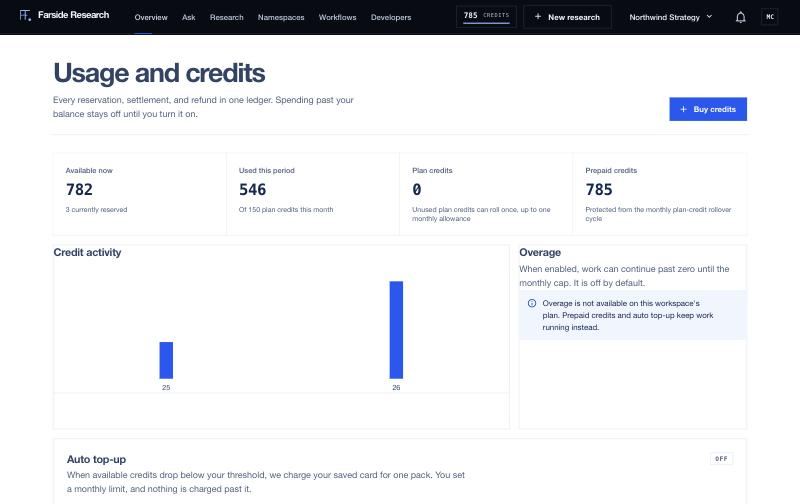
Click the credit balance in the top bar to open Usage and credits. It shows each balance and a Credit ledger of every reservation, settlement and refund, which you can filter and download with Export CSV.
Failed work and refunds
If a run fails, the credits it reserved but didn't use go back to your balance automatically. If an Ask question fails or is cancelled, everything held for it is released. If a run collected its sources but the write-up failed, Regenerate (6 credits) rebuilds the report without paying for the search again.
Rollover
Unused plan credits roll forward once, for one billing period, up to one month of your plan allowance. Anything above that limit expires at renewal. Prepaid credits are kept separately and never expire while your subscription is active.
Overage and the 80% warning
Overage is off by default. When credits run out with overage off, new paid work stops. Nothing is billed silently, and reading and exporting keep working.
To turn it on, open Usage and credits, find the Overage card, switch on Allow overage, enter a Monthly cap in dollars and click Save guardrail. Overage is billed at your plan's per-1,000-credit rate, and work stops at the cap. When overage passes 80% of the cap, workspace members get an "Overage cap is 80% used" notification, so there's time to raise the cap or add credits.
Auto top-up
Auto top-up is optional and off by default. It's on the Usage and credits page.
- Switch on Top up automatically.
- Pick a Pack to buy.
- Set When available credits fall below to a credit threshold.
- Set a Monthly limit in dollars. It's required and must cover at least one pack.
- Click Save auto top-up.
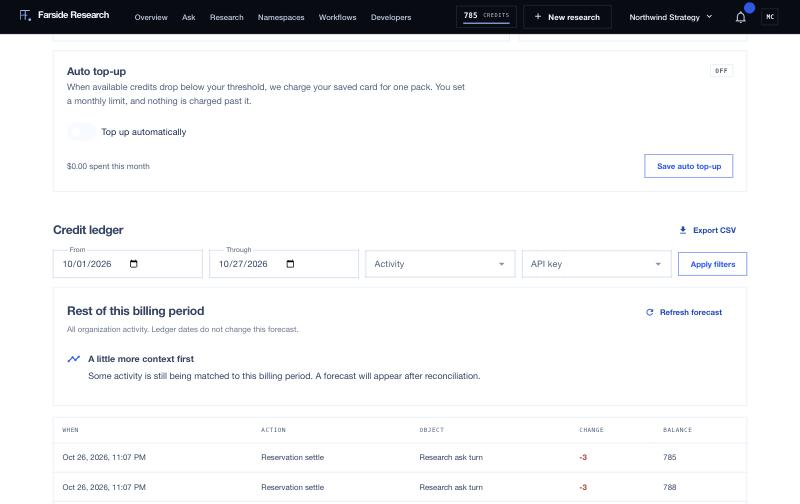
When your available credits drop below the threshold, your saved card is charged for one pack. Nothing is charged past the monthly limit. After three failed charges in a row, auto top-up turns itself off until you update your payment method and switch it back on.
You can also buy packs by hand with Buy credits on the same page. Which packs you see depends on your plan.
Solo and Starter can top up in small steps:
| Pack | Credits | Price |
|---|---|---|
| Mini | 500 | $15 |
| Plus | 1,000 | $29 |
Every paid plan, and the free trial, can buy the standard packs:
| Credits | Price |
|---|---|
| 2,500 | $120 |
| 5,000 | $220 |
| 25,000 | $950 |
| 100,000 | $3,200 |
| 500,000 | $14,000 |
Mini and Plus are for Solo and Starter only. If you move to Pro or Team, buy the standard packs instead, and an auto top-up set to Mini or Plus stops buying until you pick a standard pack. The plan is checked when each purchase happens, so a plan change always takes effect.
Tighter limits
Under Settings, then Billing, Credit guardrails sets a credit limit per billing period for the whole workspace or for one API key, as a hard stop or a warning only. Each API key can also carry its own Monthly credit cap, set on the Developers page, which helps when an automation or an AI assistant has its own key.