Farside Research runs a hosted MCP server at https://api.farsideresearch.com/mcp/. Add it to your assistant and it can start research, read reports, search sources, ask grounded questions, build dossiers and run your saved workflows. It uses the same workspace, credits and reports as the web app.
The server speaks MCP over Streamable HTTP and checks an API key in the Authorization: Bearer header on every request. Any client that can send that header can connect. Clients that can only sign in with OAuth can't connect yet.
1. Create a scoped API key
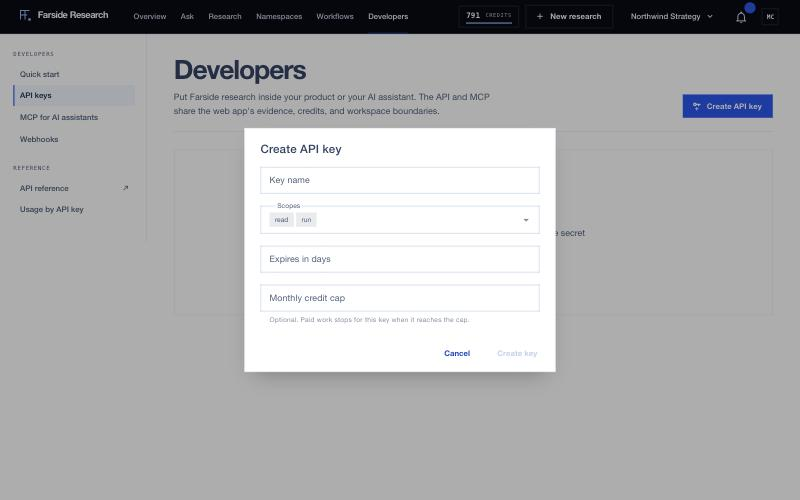
- In the app, click Developers in the top bar and open API keys.
- Click Create API key.
- Give it a Key name you'll recognize later, such as "Cursor, laptop".
- Choose Scopes:
readcovers the free tools: reading runs, listing work, searching sources, estimating cost and reading workflow runs.runcovers work that can spend credits (starting research, asking, building dossiers, running workflows) and deciding approvals.admincovers both. New keys default toreadandrun. A key with onlyreadis a safe way to let an assistant browse past research without spending anything.
- Optionally set Expires in days and a Monthly credit cap. Once a key reaches its cap, paid work through that key stops.
- Click Create key and copy the secret. It starts with
sk_and is shown once. If you lose it, rotate the key to get a new one.
One key per client is worth the small effort: you can see each one's spending, cap it, and revoke it without touching the others.
2. Add the server to your client
In every example, replace YOUR_API_KEY with the key you just copied. Treat the file like a password: anyone with the key can spend your credits.
Claude Code
Run this in the project where you want research available, then run /mcp inside Claude Code to check that farside is connected:
claude mcp add --transport http farside https://api.farsideresearch.com/mcp/ \
  --header "Authorization: Bearer YOUR_API_KEY"
Cursor
Add this to .cursor/mcp.json in your project, or to ~/.cursor/mcp.json to use it everywhere. Then open Cursor Settings, then MCP, and check that farside is enabled.
{
  "mcpServers": {
    "farside": {
      "url": "https://api.farsideresearch.com/mcp/",
      "headers": {
        "Authorization": "Bearer YOUR_API_KEY"
      }
    }
  }
}
VS Code
Create .vscode/mcp.json in your workspace. VS Code asks for the key the first time the server starts and stores it, so the key never sits in the file. Use the tools from Copilot Chat in agent mode.
{
  "inputs": [
    {
      "type": "promptString",
      "id": "farside-api-key",
      "description": "Farside Research API key",
      "password": true
    }
  ],
  "servers": {
    "farside": {
      "type": "http",
      "url": "https://api.farsideresearch.com/mcp/",
      "headers": {
        "Authorization": "Bearer ${input:farside-api-key}"
      }
    }
  }
}
Claude Desktop
Claude Desktop's config file starts local servers, so it reaches the hosted endpoint through the mcp-remote bridge. You need Node.js 18 or newer. Open Settings, then Developer, then Edit Config, add this block to claude_desktop_config.json, and quit and reopen Claude Desktop:
{
  "mcpServers": {
    "farside": {
      "command": "npx",
      "args": [
        "-y",
        "mcp-remote",
        "https://api.farsideresearch.com/mcp/",
        "--header",
        "Authorization:${FARSIDE_AUTH}"
      ],
      "env": {
        "FARSIDE_AUTH": "Bearer YOUR_API_KEY"
      }
    }
  }
}
The header value lives in env and has no space after the colon on purpose: some systems split arguments on spaces.
Any other client
Add a remote (HTTP) MCP server with:
- Transport: Streamable HTTP
- URL:
https://api.farsideresearch.com/mcp/ - Header:
Authorization: Bearer YOUR_API_KEY
The server keeps no session, so each request is checked on its own. It accepts the key only in the Authorization header; X-API-Key works on the REST API but not here.
Check a key in the app
The MCP for AI assistants section on the Developers page builds a config block for you. You can also paste a key secret there and click Validate API key to check that it's valid and has the read scope. The check doesn't store the key or open an MCP session.
3. The 11 tools
| Tool | What it does | Cost |
|---|---|---|
estimate_cost |
Prices a Standard or Deep run and shows the balance left after | Free |
start_research |
Starts a research run | 25 credits Standard, 120 Deep |
get_research |
Reads a run's status, report and quality | Free |
list_research |
Finds earlier runs by status, namespace, tag or text | Free |
ask_research |
Asks one run's evidence a question | Your free questions for the day first, then the per-question price; web search always 6 credits |
search_sources |
Filters a run's graded sources by quality, relevance, domain or keyword | Free |
create_dossier |
Builds a 3 to 12 document dossier from a completed run | 60 credits |
list_workflows |
Lists your workflows with schedule, credit ceiling and last run | Free |
run_workflow |
Starts a saved workflow now | Each step's price, reserved as it starts |
get_workflow_execution |
Reads a workflow run with every step's status and outputs | Free |
decide_workflow_approval |
Approves or rejects a step that's waiting | Free |
Current prices are on the pricing page. The server also exposes four read-only resources (fathom://runs/recent, a run's synthesis at fathom://runs/{run_id}/synthesis, its sources at fathom://runs/{run_id}/sources, and your balance at fathom://account/credits) and a research_brief prompt that turns a loose topic into a research brief.
Estimate before you spend
estimate_cost is free. It returns the credit price, an estimated source range, the number of included documents, an estimated duration in minutes and your balance after the run. A good standing instruction for your assistant:
Before calling start_research, call estimate_cost and tell me the price and my remaining balance. Check list_research for an existing run on the same question first.
A typical sequence:
list_researchto see whether you already have a report on this.estimate_costwith the question and depth.start_researchafter you agree. It returns a run id and apoll_withhint.get_researchonce the run has had time to finish (Standard runs are estimated at 7 to 18 minutes).ask_researchorsearch_sourcesto dig into the result.
Retries without double charges
start_research, ask_research, create_dossier and run_workflow take an idempotency_key. If a call times out or the response is unclear, call again with the same key and the same inputs: you get the original result back instead of new paid work. A new key always starts new work. ask_research requires a key; for the others it's optional but worth passing.
If something fails
- "Missing Bearer API key" means the client isn't sending the
Authorizationheader. - "Invalid, expired, or revoked Farside API key" means the key was mistyped, rotated, revoked or has expired.
- "The API key requires the 'run' scope" means the key is read-only. Create a key with
run, or keep it read-only on purpose. - An insufficient-credits error names the shortfall. Buy credits or wait for your next plan period.
- "The organization rate limit was exceeded" means too many calls in a short window. The response says how many seconds to wait.