
Farside didn't start as a product. It started inside Mission Control, the platform I run the company on. A lot of the work there starts with research, and I wanted something better and more reliable than what I was using. So I started building my own deep research app into Mission Control. Then I got carried away. It kept getting better until it clearly didn't need the rest of Mission Control to be useful, so I pulled it out and it became Farside.
What I wanted from the start was research I could check. Not a confident paragraph with a few links stapled on the end, but a report where I can see every source it looked at, why each one was kept or thrown out, and which sentence leans on which page.
So here's what actually happens when you ask it something. Every screenshot below comes from one real run on my own account. The question was deliberately ordinary, nothing to do with AI or software:
For a 120-seat full-service restaurant, is switching the kitchen line from gas to induction worth it in 2026?
I'm not a restaurant owner. That's the point. It's the kind of question where you don't know which sources to trust, the numbers vary a lot, and a wrong answer costs real money.
#1. You ask, and say who it's for
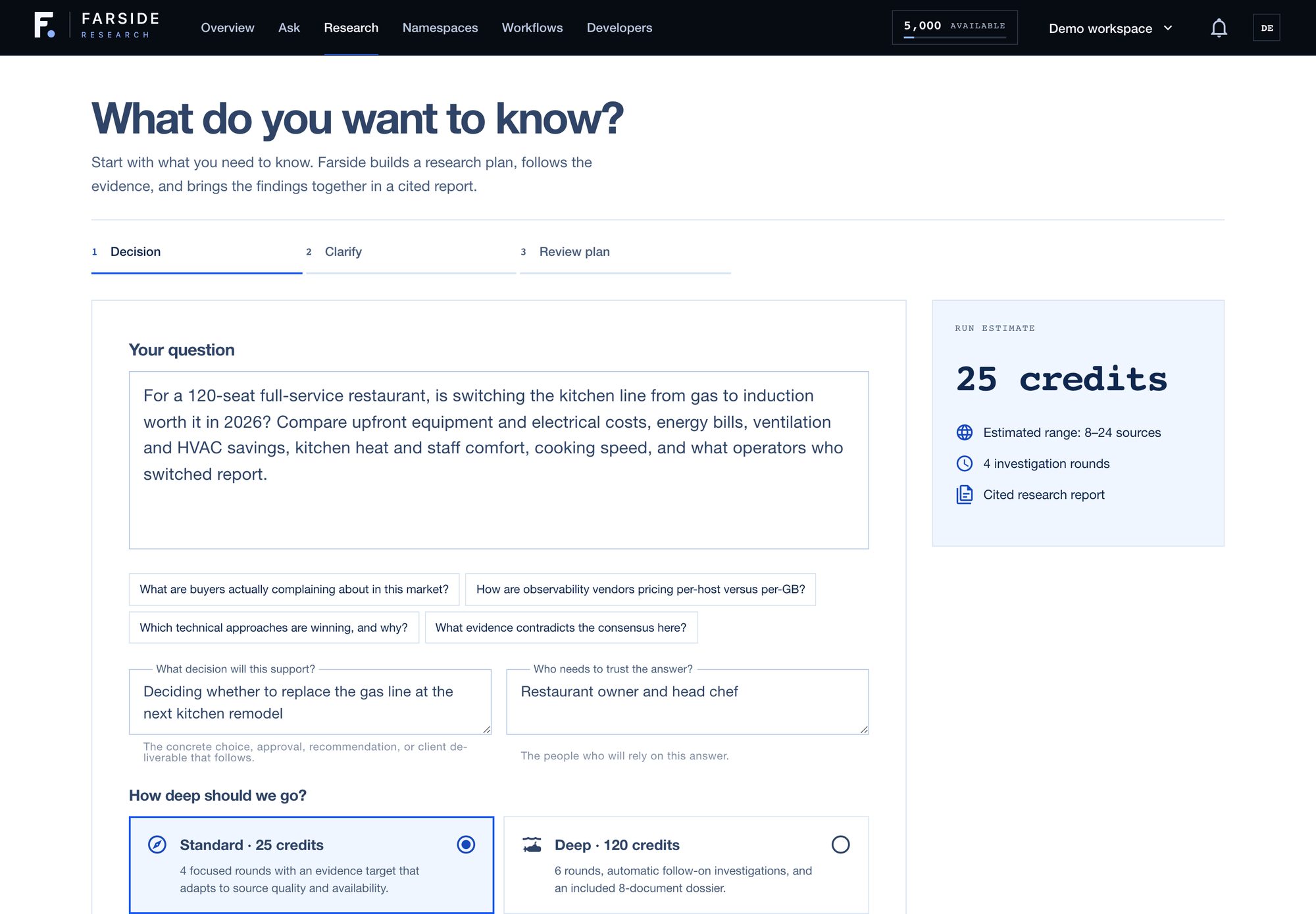
The question is the only thing you have to fill in. Two more boxes are worth the ten seconds: what decision this supports, and who needs to trust the answer. For this one I said the decision is whether to replace the gas line at the next kitchen remodel, and the readers are the owner and the head chef. That changes the report a lot: it leans toward payback and running costs instead of a physics lesson about induction.
You also pick a depth. Standard runs 4 rounds. Deep runs 6, follows up on side questions automatically and adds a dossier. Either way, the credit cost is on screen before you start.
If the question is vague, Farside asks a couple of clarifying questions next. You can skip them. Then you see the plan before it runs.
#2. It plans, then works in rounds
First it writes a brief: what kind of question this is, what a good answer needs to cover, and what would count as strong evidence.
Then it works in rounds. Every round goes like this:
- Plan. Decide what to search for next, based on the brief and on what's still missing.
- Search and read. Run the searches, then fetch and read the actual pages, not just the snippets.
- Grade. Score every source it found (more on that next).
- Find the gaps. Look at what the evidence so far does and doesn't answer, and aim the next round at the holes.
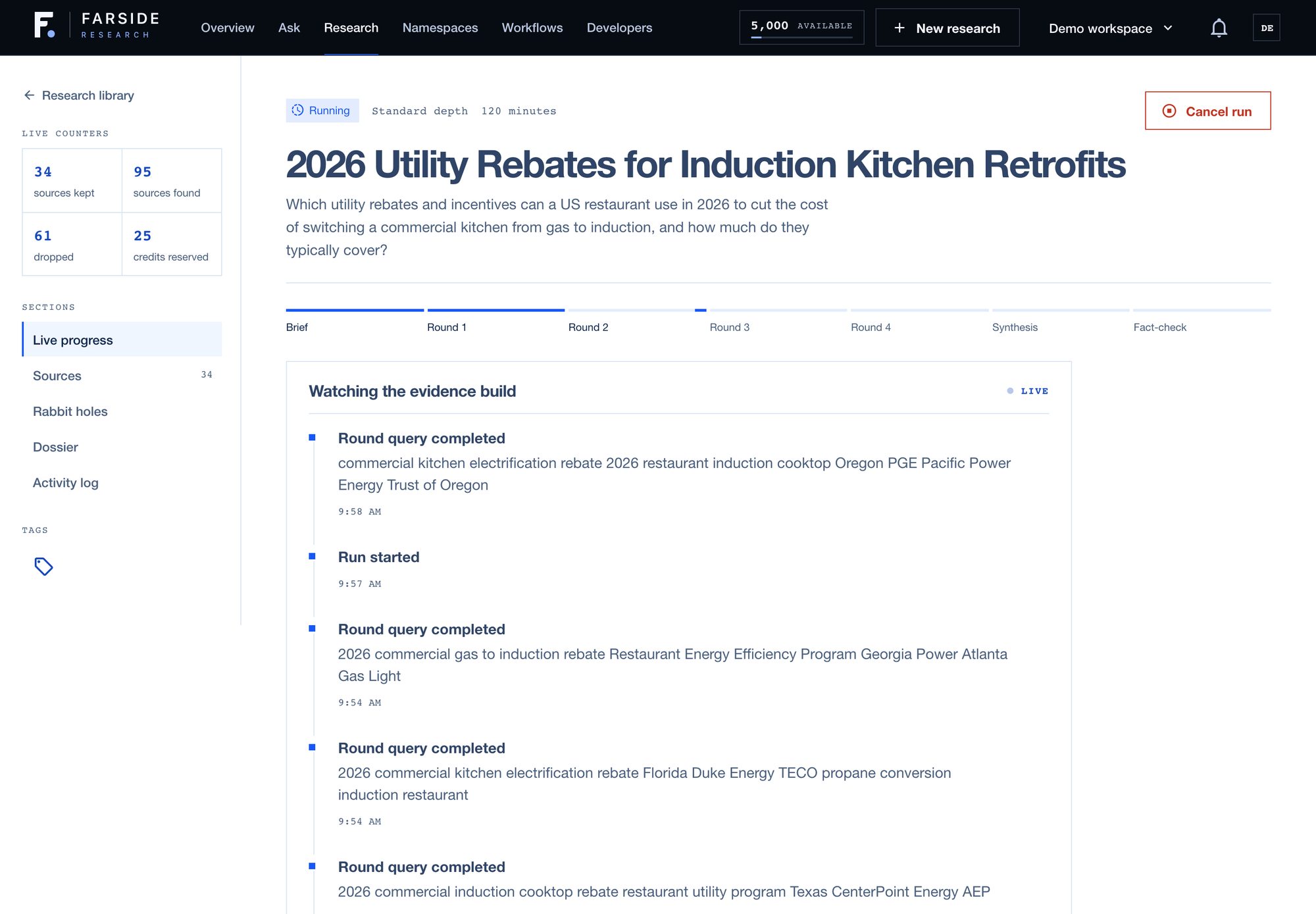
The rounds are why it takes a while. This one took 26 minutes. I'd rather wait half an hour for something I can check than get something instant I can't.
#3. Every source gets graded, and you can see the grades
This is the part I care about most.
Every source gets two scores. Quality, from 0 to 100, is about the source itself: is it primary, is it current, does it show its work. Relevance, from 0 to 1, is whether it actually bears on your question. A source needs at least 45 for quality and 0.3 for relevance to be used as evidence.
Both bars matter. A dictionary entry from a reputable site is high quality and useless for a database comparison. Reputable and useful aren't the same thing, so a source has to clear both.
Dropped sources don't disappear. They stay in the list, marked dropped, with their scores. If you think it threw out something good, you can see that it did.
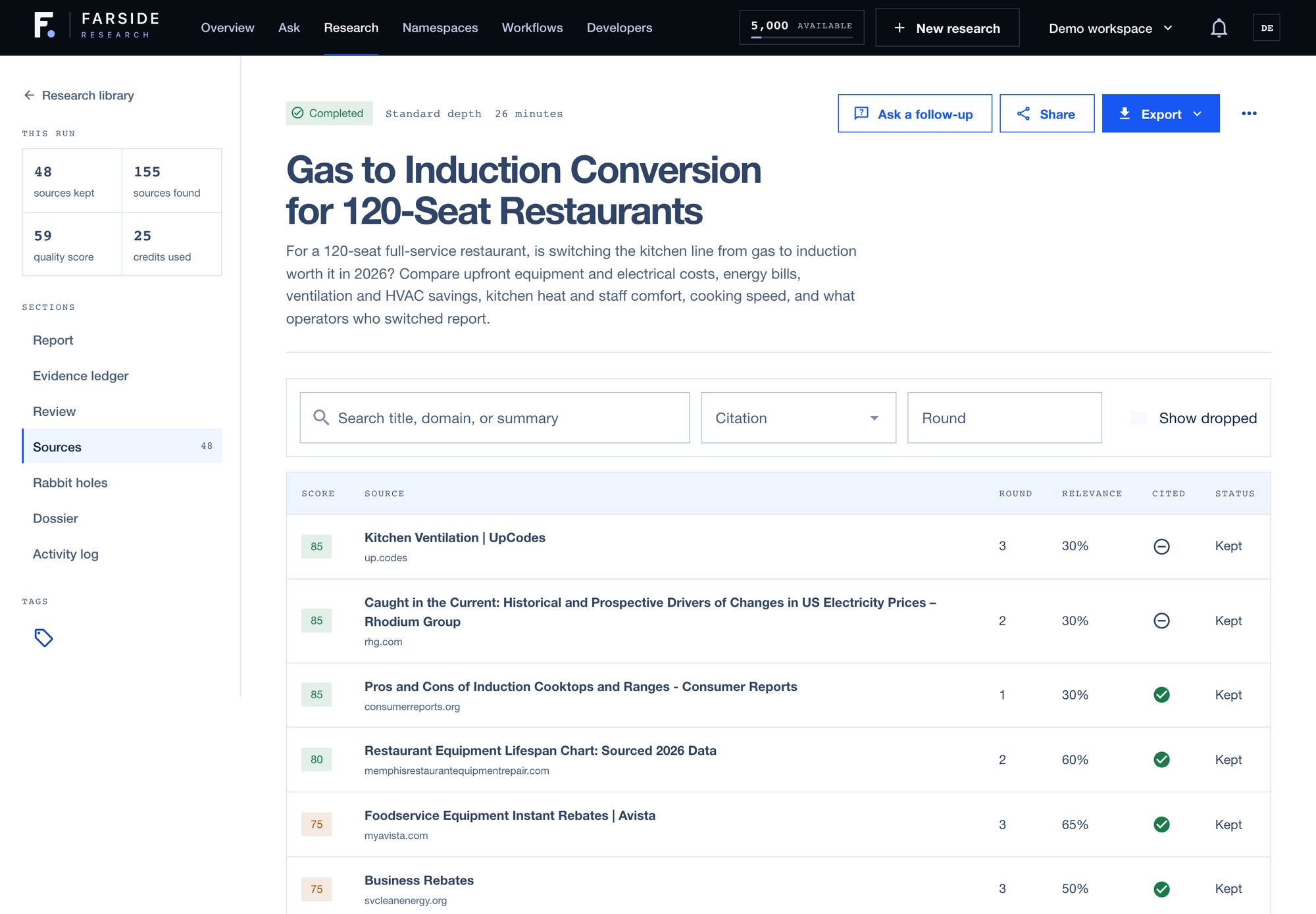
This run found 155 sources and kept 48, and the report carries 192 citations to them. My favorite drop: a government page on electricity use in homes. It scored 95 on quality and 0 on relevance. A great page about the wrong thing. An encyclopedia entry on microwave ovens didn't make it either.
#4. The report
The report has the same shape every time, because that's what makes reports comparable:
- Bottom line first, in plain language.
- Key findings, each with a confidence level and the reason for it.
- Analysis, data tables and charts where the evidence supports them.
- Contradictions, where sources disagree and which one it trusts more and why.
- Limitations, what the evidence couldn't answer.
- Recommendations, each one aimed at whoever would act on it.
Every claim carries numbered citations back to the sources.
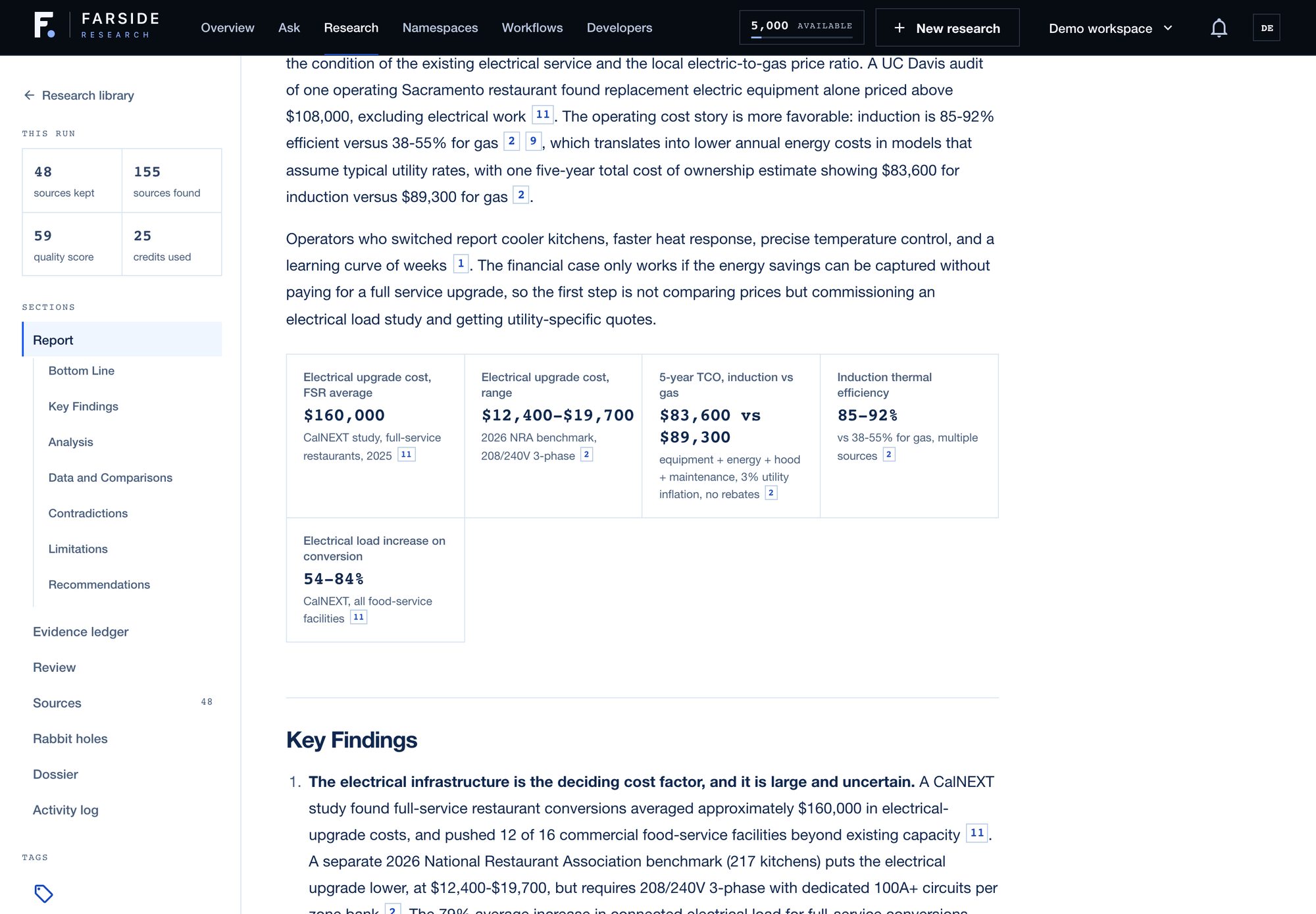
Then come the checks the model doesn't get a vote on. They're the Fact-check stage you saw in the progress bar:
- Every citation has to point at a real source. A citation number with no source behind it gets flagged.
- Every number in a chart or a key figure has to appear in the evidence. A chart makes a number look authoritative, so a charted number that no source stated is worse than one buried in a sentence. A chart with any unsupported number is removed whole, and an unsupported key figure is dropped.
- A cleanup pass for robotic writing. It strips the usual tells, and a check makes sure it didn't change a single citation or number on the way. If it did, that section keeps its original text.
#5. The Evidence ledger
Reading a report top to bottom is one way to use it. The other is to ask "what exactly is this claiming, and on what basis?"
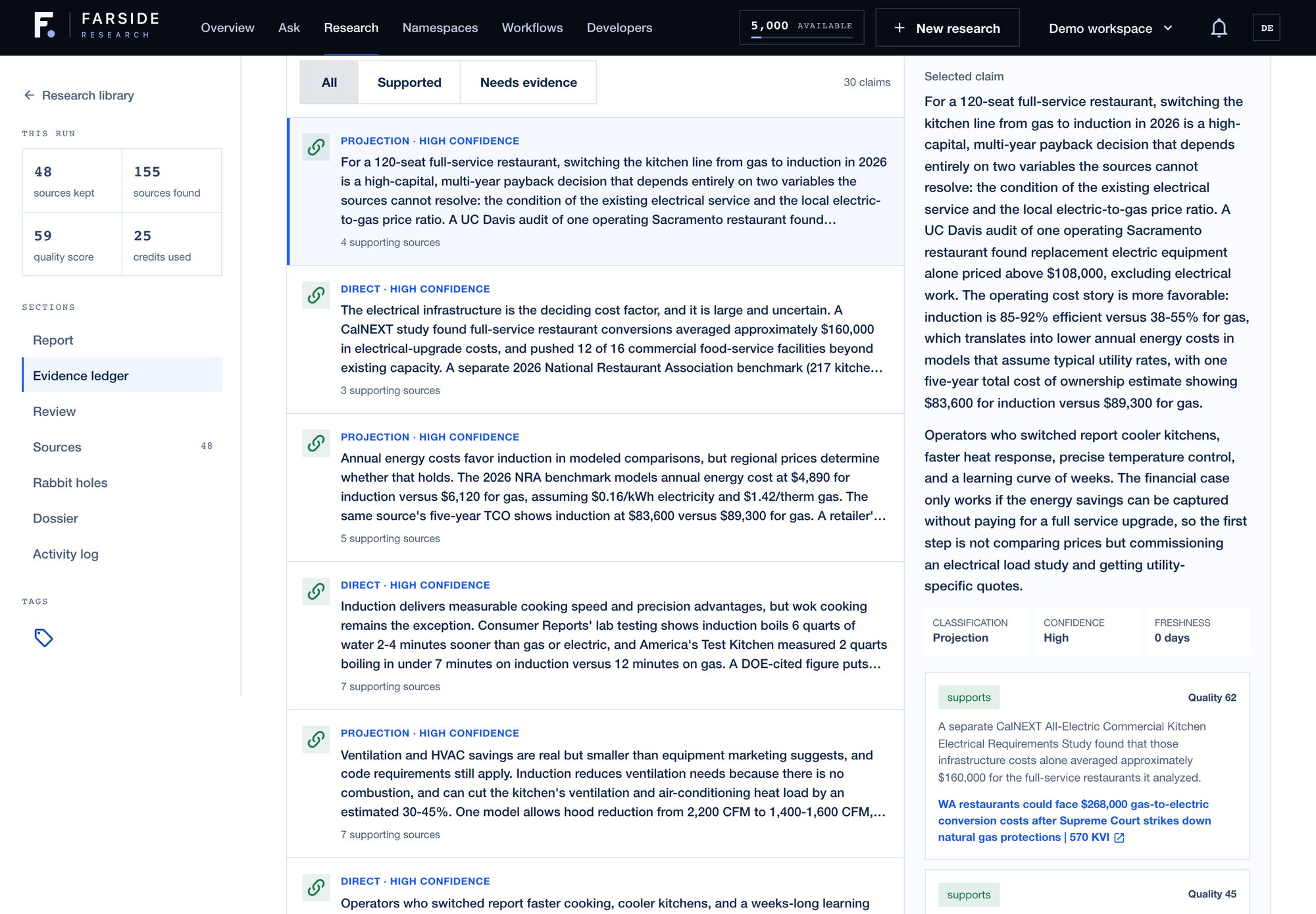
The Evidence ledger answers that. Each material paragraph in the report becomes a claim, linked to the sources it cites, and tagged as one of four kinds: direct (a source says it), inference (it follows from what sources say), projection (it's about the future), or disputed (sources disagree).
#6. Decision readiness
Every finished report gets one Decision readiness score out of 100, at the top of the Evidence ledger. It isn't the model grading its own homework. It comes from nine checks on the report and its sources:
| Check | What passes | Points |
|---|---|---|
| Claim coverage | 80% or more of the claims cite a kept source | 20 |
| Citation integrity | No citation points at a source that doesn't exist | 20 |
| Evidence volume | At least 8 sources kept | 10 |
| Source quality | Kept sources average 60 or better | 10 |
| Source relevance | Kept sources average 0.5 or better | 10 |
| Source diversity | At least 4 different sites | 10 |
| Open evidence gaps | 3 or fewer left unresolved | 10 |
| Evidence freshness | 70% or more of sources gathered in the last year | 5 |
| Counterevidence | At least one disputed claim is on the table | 5 |
The first seven are required for a report to be marked ready. The last two count toward the score but don't block it.
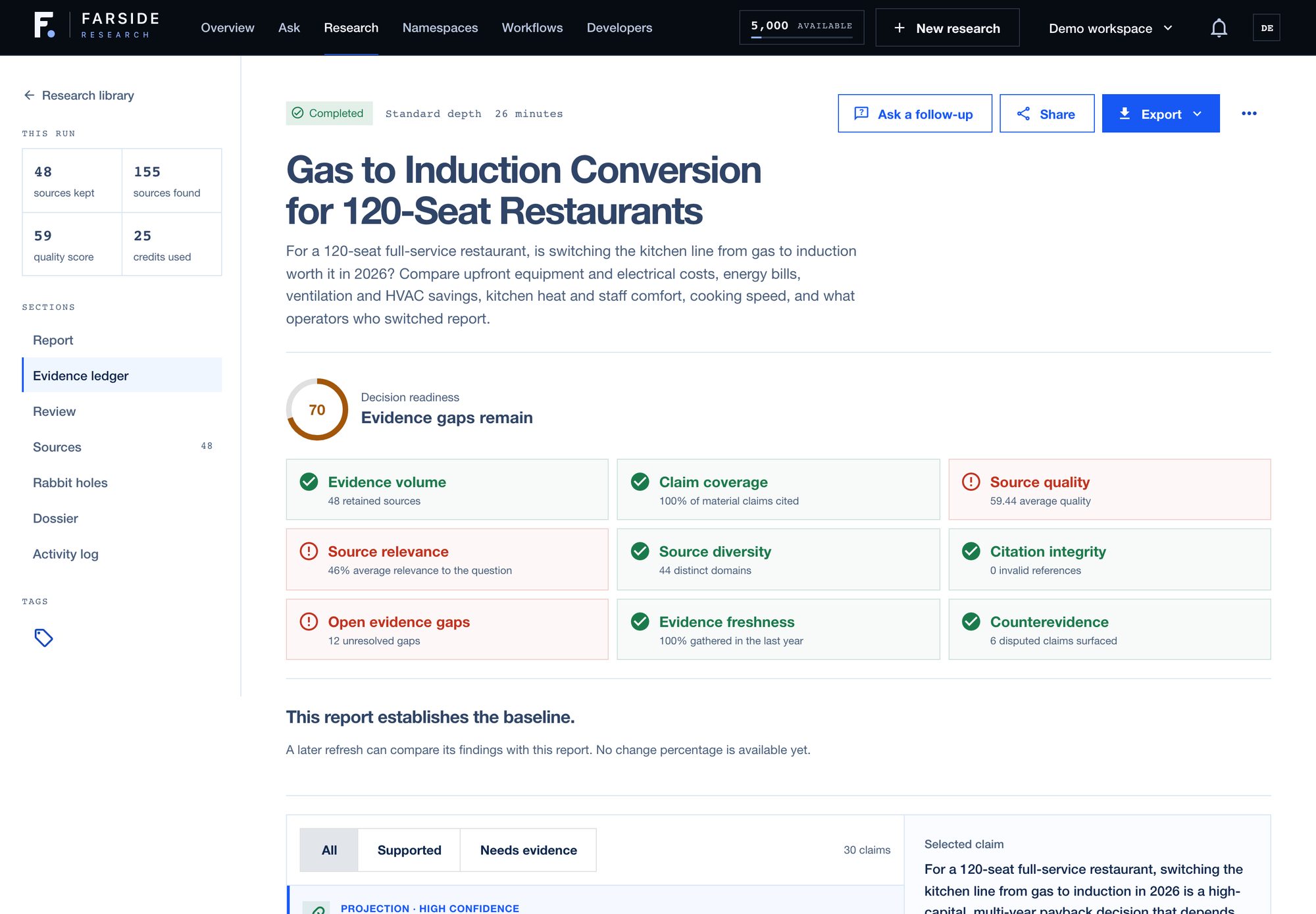
A high score doesn't mean the report is right. It means the report has the shape of something you can act on: enough sources, from enough places, cited properly, with the open questions written down. A low score tells you where to push before you bet on it.
This run scored 70, and the panel spells out exactly what would raise it: source quality and relevance just under their bars, and 12 open gaps, each one specific. No contractor estimates for a full commercial conversion. No side-by-side utility bills from a restaurant kitchen. No case studies from restaurants that actually switched. That's your next research run, already scoped, and it's exactly what to close before you sign anything with an electrician.
#7. Ask follow-ups
A report usually raises the next question. Ask lets you put it to the research you already have: this report, a few reports, a whole namespace or tag, or everything in your workspace. Answers cite back to the sources, so you can click through to the exact page.
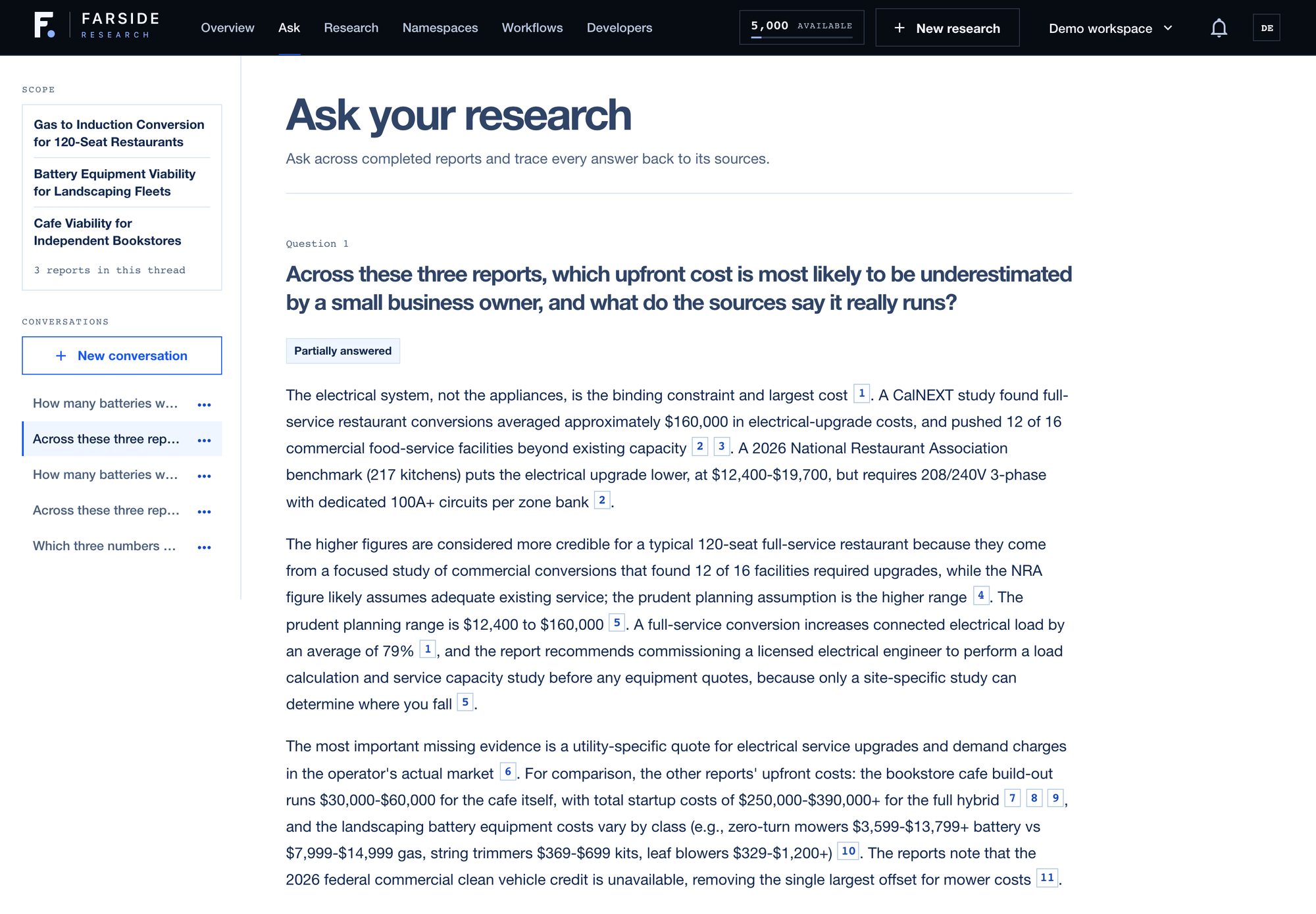
I asked this report and two others which upfront cost a small business owner is most likely to underestimate. It picked the restaurant's electrical upgrade, and showed why: an industry benchmark says $12,400 to $19,700, while a focused study of commercial conversions found an average around $160,000.
Before an answer goes out, each statement in it gets checked against the sources, and anything that can't be confirmed is left out. Ask gets its own post.
#Keeping it organized
One report is easy to keep track of. Thirty aren't, and the whole point is that you'll keep running them.
So every run lives in a namespace, which is just a folder: one per client, project or topic. You can also give a run tags when you start it, like "pricing" or "q1-planning", for the threads that cut across folders. Everyone starts with a Default namespace, so none of this needs setting up before your first run.
It pays off later. Ask can draw on a whole namespace or everything with one tag, so "what have we learned about this client?" becomes a single question instead of an afternoon of rereading. And if you delete a namespace by mistake, you can recover it.
#What it costs, and what happens when a run fails
Research uses credits, and the estimate is on screen before you start, so there's no guessing what a Deep run will cost.
When a run starts, Farside sets aside the credits it needs and charges for the work as it finishes. If a run fails partway or you cancel it, whatever was set aside for unfinished work comes back on its own. You don't have to file a ticket or ask.
Running out doesn't surprise you either. New paid work just stops until you top up, and reading or exporting the reports you already have keeps working. The current prices are on the pricing page.
#How it stays honest
The trait I care about most is a report that admits what it doesn't know. When no source has the number you asked for, Farside says so plainly instead of making one up. A few more rules every report follows:
- Numbers keep their fine print. If a source says a figure only holds for a certain setup or time period, the report says that too, or lowers its confidence.
- The official page wins. A third-party site quoting a vendor's prices is never treated like the vendor. Second-hand figures are labeled as second-hand and scored lower.
- Follow-ups answer every part. Ask a two-part question and you get both parts, or a plain note saying which part the research doesn't cover.
We also audit our own reports, checking the load-bearing numbers against the live source pages, and every audit makes these rules sharper.
#Bring the decision you're stuck on
Everyone has one: the call you keep putting off because you don't trust what you've read so far. That's the question Farside is built for. Ask it once, read the sources it kept and the ones it threw out, and decide with the evidence in front of you.
Start at app.farsideresearch.com. And if a report gets something wrong, I want to know. Send me a note with the report and what you found.