
I've been sitting on this one, and it's killing me.
StateFrame is an engine. It's the thing I'm proudest of, and it lives in a terminal. Try showing that off. You turn the laptop around, some text scrolls by, and the best you can hope for is an "oh, neat," the way you'd say it to a kid holding a rock.
So for a while now I've been building the car around it. It's called MainFrame, it's a desktop app for working with coding agents, and this is a real look at it.
You can't download it yet. It's an upcoming early release, and I'll tell you what's rough before we're done. Let me show you the good stuff first.
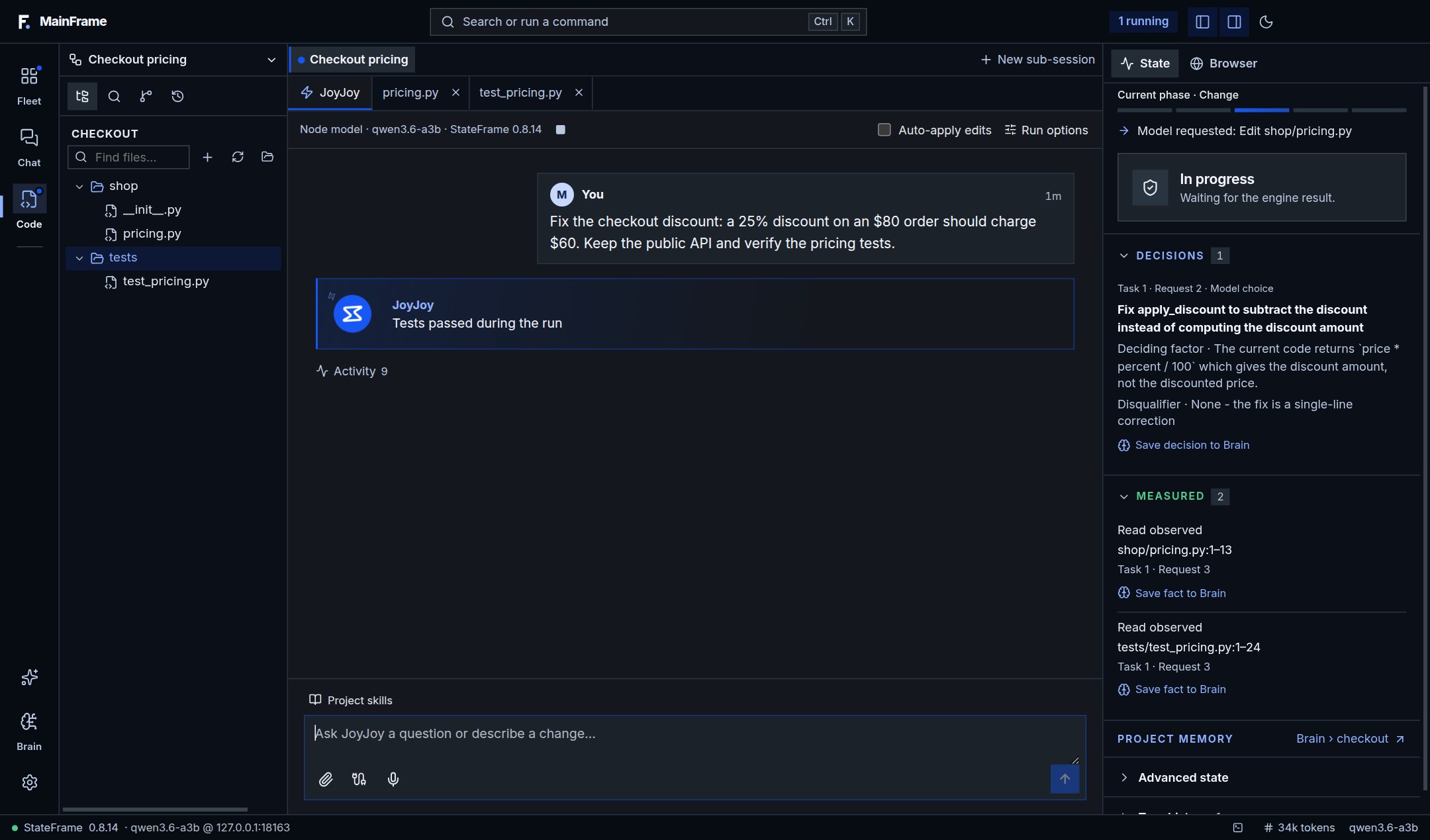
#Look at the right side
Every coding agent has the middle part. You type, it works, it talks. Fine.
Now look right. That panel is State, and it isn't a log of what the agent said. It's what the engine has on record about the job. Which phase it's in. The decision the model made, and the reason it gave: the current code returns the discount amount instead of the discounted price. That part's the model talking, and it's labeled as the model's choice. Under it, in green, is what was measured: which files were read, which lines, on which request. Nobody had to take the model's word for that.
Says versus did, side by side, while it's running.
Once you've worked that way it's hard to go back. I don't want to scroll through four screens of an agent narrating its feelings to find out whether it opened the file. I want to glance right and know.
And notice the middle. The tests passed during the run, and the panel still says waiting for the engine result. The model doesn't get to call it.
See those little "Save to Brain" links? We'll get there.
#About the name
The agent doing the work is called JoyJoy. It's right there on the tab.
JoyJoy is my wife's nickname. I named it after her. Of everything in the app, that's the one decision that was never up for debate.
#It works on a copy
When you ask for a change, the work happens on a copy of your project. The checks run on that copy. You get a diff, and nothing lands in your real files until you apply it. If you trust a project enough, there's a box for auto-apply. If the files moved underneath it while it was working, MainFrame can hold the patch for you to look at instead of charging ahead.
Here's what a finished one looks like, from a newer build in day mode. Checks first, then the diff.
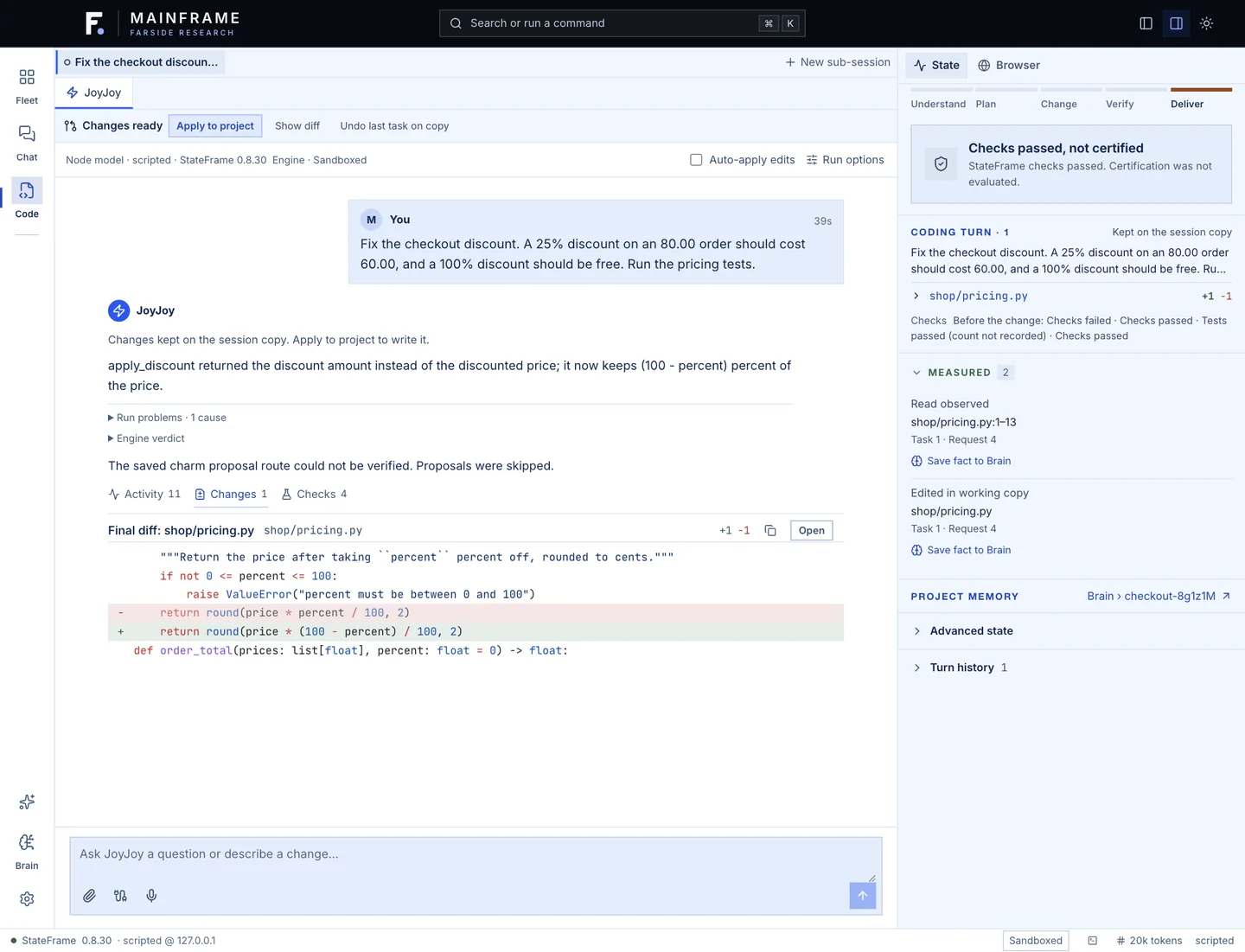
The failed check stays in there on purpose. I want to see it was broken before, passing after, and exactly which line made the difference.
And look at the wording up top: checks passed, not certified. Nobody evaluated certification on that run, so the app won't pretend somebody did. Five green tests is five green tests.
It's the boring part of the app and the reason I'd let it near anything I care about.
#Charms: the part I'd buy it for
Here's the idea I'm most excited about.
Every tool I've ever used was built by somebody who was guessing what I needed. Some of them guess well. But there's always the thing that's missing, the weird little tracker that only makes sense for how you work, and you end up keeping it in a notes file or a spreadsheet called stuff_FINAL_2.
In MainFrame you describe that missing tool. One sentence is enough to start:
Give me a release board. Track what's queued, what's in review and what's done.
The model you picked drafts it. You see a preview. If it's what you meant, you install it, and it shows up in your sidebar as part of the app, with its own records, its own pages and its own chat. That's a charm. A bug tracker, a research log, a findings list that links back to the check that failed. No code to write.
BeforeThe usual way
Notice you need a tool
Find an app that's close
Make an account
Bend how you work to fit it
Keep the real version in a spreadsheetAfterWith a charm
Notice you need a tool
Say what it should do
Check the preview
Put it in your sidebar
Change it when the work changes
The safety side matters as much as the fun. A charm is a description, made out of fields, views and actions on its own records. It isn't a pile of generated code running loose on your machine, and the definition has no direct access to your files, your commands or the network. You can hand one to a friend, too: export the charm by itself, or choose to include the records.
So the app you have after three months shouldn't look like the one you installed. That's the line on the website, and I meant it: the tool that grows into what you need.
#Fleet: more than one set of hands
One agent in one window gets old. So there's Fleet.
Fleet is a board of nodes, and each node is an agent with its own editor, its own conversation and its own history. Group them by job. Pass a result from one assignment to the next, so the agent writing the release notes starts from the total that the one reviewing the catalog actually came back with. If a node needs the edit from another node applied first, it can wait. If the earlier result came back uncertain, it can stop, instead of cheerfully building on sand.
I run a lot of agents at once. I've killed my laptop seven times doing it. Mostly what I wanted was to walk in, look at one screen, and know who's working, who's done, and who's standing in the corner waiting on me.
#Brain: so you only explain it once
You know that feeling when you tell an agent something important on Monday and by Wednesday you're telling it again? Brain is for that.
When a run makes a decision worth keeping, or measures something that's true about your project, you save it with one click, along with where it came from. Turn Brain on for a coding node and its next run can start with the entries that match. Not "here's everything we ever said." The decision, and the receipt.
I care about the receipt. A memory without a source is just a rumor your computer believes.
#The engine is the point
All of it sits on StateFrame, and that's why it can do this. Each request is built from the current state of the job inside a prompt budget you can size to your model, and it doesn't grow as the run goes on, so there's no conversation piling up in the background for the app to fight with. Reads, edits and check results are recorded as they happen, which is exactly what that State panel is showing you.
It also means you bring the model. MainFrame talks to compatible endpoints, whether that's one running on a box under your desk or something hosted. Your project files and history stay on your computer. The context a request needs goes to the endpoint you chose, so if that's a hosted one, know that going in.
#What's rough
You made it this far, so here's the honest part.
- There's nothing to download yet. The early release is planned for Linux desktops. macOS is in testing, and signing and notarization are still on the list. I don't have a date, and I'd rather not invent one.
- Charms use a fixed set of parts. Fields, views and record actions today. Letting one run its own isolated code is planned, with network access off until you allow it. I've got concepts for slide decks and media editors that aren't possible yet.
- Your coding agents can't use charms yet. A charm's own chat can read its records. Agents in Code and Fleet can't, in the current build. I want that one badly.
- A check needs to exist. If your project has no tests and no command to run, the run has no result to show you. I can't verify what isn't there.
- It's built for your own desktop first. Settings live with your profile. No central admin or single sign-on in the current build.
When it ships, the plan is the same as StateFrame: AGPL, or the same commercial license if you need one. It falls under the same promise.
#Why I'm building it
I could have left it at the engine. Plenty of people only need that.
But I keep thinking about how it feels to work with these things all day. A lot of it right now is faith. You type something, a wall of text comes back, and you decide whether to believe it. I don't want faith. I want to see the work, change the tool when it doesn't fit, and go to bed knowing nothing got applied that I didn't look at.
That's the app I wanted, so that's the app I'm building. There's plenty more on the MainFrame page, including the limits in more detail.
What's the tool you'd describe first? The weird one, the one that only makes sense for how you work. Tell me. I'd love to see if a charm can be it.
Pass it on